Html Tag

- What is HTML Tag ?
-> HTML tags are like keywords which defines that how web browser will format and display the content. With the help of tags, a web browser can distinguish between an HTML content and a simple content. HTML tags contain three main parts: opening tag, content and closing tag. But some HTML tags are unclosed tags
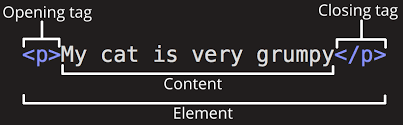
- Different types of Tags in HTML are listed below.
<!DOCTYPE> Defines the document type
<head> Defines information about the document
<title> Defines a title for the document
<body> Defines the document's body
Formatting Tag
<h1> to <h6> Defines HTML headings
<p> Defines a paragraph
<br> Inserts a single line break
<abbr> Defines an abbreviation or an acronym
<address> Defines contact information for the author/owner of a document/article
<b> Defines bold text
<strong> Defines important text
<i> Display the content in italic style
<em> Defines emphasized text
<blockquote> Defines a section that is quoted from another source
<sub> Defines subscripted text
<sup> Defines superscripted text
<mark> Defines marked/highlighted text
<strike> Defines strikethrough text
<progress> Represents the progress of a task
<bdo> Overrides the current text direction
Forms and Input Tag
<form> Defines an HTML form for user input
<input> Defines an input control
<textarea> Defines a multiline input control (text area)
<button> Defines a clickable button
<select> Defines a drop-down list
<option> Defines an option in a drop-down list
<optgroup> Defines a group of related options in a drop-down list
<label> Defines a label for an <input> element
<fieldset> Groups related elements in a form
<legend> Defines a caption for a <fieldset> element
<datalist> Specifies a list of pre-defined options for input controls
Frames Tag
<iframe> Defines an inline frame
Images Tag
<img> Defines an image
<map> Defines a client-side image-map
<area> Defines an area inside an image-map
Audio / Video Tag
<audio> Defines sound content
<video> Defines a video or movie
<source> Defines multiple media resources for media elements ( and )
Links Tag
<a> Defines a hyperlink
<link> Defines the relationship between a document and an external resource (most used to link to style sheets)
Lists Tag
<ul> Defines an unordered list
<ol> Defines an ordered list
<li> Defines a list item
<dl> Defines a description list
<dt> Defines a term/name in a description list
<dd> Defines a description of a term/name in a description list
Tables Tag
<table> Defines a table
<caption> Defines a table caption
<th> Defines a header cell in a table
<tr> Defines a row in a table
<td> Defines a cell in a table
<thead> Groups the header content in a table
<tbody> Groups the body content in a table
<tfoot> Groups the footer content in a table
Styles and Semantics Tag
<style> Defines style information for a document
<div> Defines a section in a document
<span> Defines a section in a document
<header> Defines a header for a document or section
<footer> Defines a footer for a document or section
<main> Specifies the main content of a document
<section> Defines a section in a document
<article> Defines an article
<aside> Defines content aside from the page content
Meta Tag
<meta> Defines metadata about an HTML document
Programming Tag
<script> Defines a client-side script
<noscript> Defines an alternate content for users that do not support client-side scripts
Semantic Tag
<article> Defines an article
<aside> Defines content aside from the page content
<details> Defines additional details that the user can view or hide
<figcaption> Defines a caption for a <figure> element
<figure> Specifies self-contained content, like illustrations, diagrams, photos, code listings, etc.
<footer> Defines a footer for a document or section
<header> Specifies a header for a document or section
<main> Specifies the main content of a document
<mark> Defines marked/highlighted text
<nav> Defines navigation links
<section> Defines a section in a document


